
PYTHON3.15 4K RESOLUTION SYSTEM MONITOR

HERE IS A 4K RESOLUTION, HIGH QUALITY SYSTEM MONITOR WRITTEN IN PYTHON3.15. FREE MEMORY IS IN PURPLE, CPU POWER USAGE IS BLUE, AND HARD DRIVE USAGE IS BLUE/RED… IT’S ACTUAL FUNCTIONS ARE NOT VERY ADVANCED AND WE DIDN’T SPEND THAT MUCH TIME TO CREATE IT, BUT IT IS HERE AND YOU CAN USE IT ANYWAYS, PERHAPS YOU’LL FIND SOME USE FOR IT… HERE’S WHAT IT LOOKS LIKE:
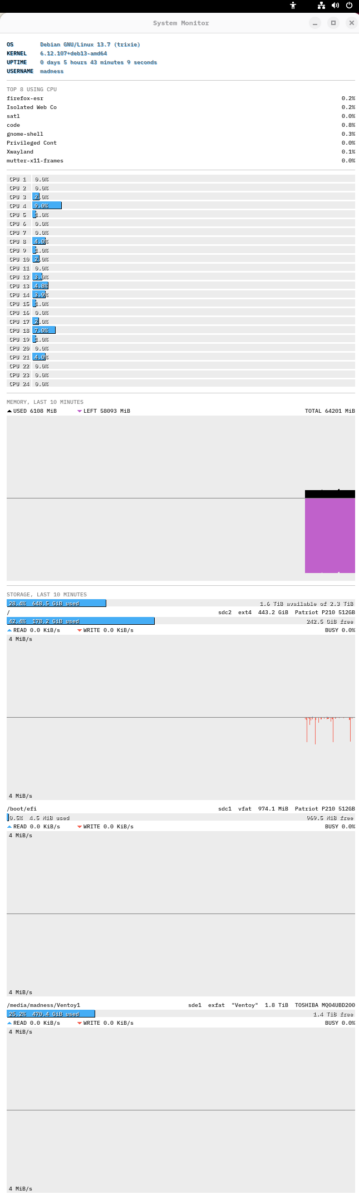
MORE PURPLE IS BETTER, AND THE MORE “BLUE” THAT YOU HAVE, THE WORSE IT IS, JUST KEEP THOSE TWO THINGS IN MIND WHILE YOU ARE USING IT, IF THERE’S TOO MUCH BLACK, OR TOO MUCH BLUE, THEN YOUR USING YOUR SYSTEM TOO MUCH, AND YOU’VE GOT TO PUSH BACK ON WHAT YOUR USING…
HERE IS THE SCRIPT:
#!/usr/bin/env python3
"""System monitor: a tall tkinter window to draw bars and graphs in."""
import collections
import os
import platform
import pwd
import re
import subprocess
import sys
import time
import tkinter as tk
import tkinter.font as tkfont
WINDOW_WIDTH = 650
BACKGROUND = "white"
LOG_FILE = os.path.expanduser("~/.cache/system_monitor.log")
TOP_PROGRAMS = 8 # rows in the CPU list
CPU_THRESHOLD = 1.5 # % of the whole CPU (all cores, as GNOME System Monitor counts) that
# sends a program to the top of the list
HISTORY = 600 # seconds of reading and writing in each storage graph
GRAPH_FLOOR = 4 * 1024 * 1024 # bytes a second: no half of a storage graph scales lower, so
# the steady trickle of log and journal writes stays small
MIN_GRAPH_HEIGHT = 47 # pixels, room for both scale labels: once the graphs can't
# all have this much, the last storage cards run off the bottom
FONT = ("IBM Plex Mono", -10) # regular weight; a negative size is in pixels
TEXT_COLOR = "#202020"
LABEL_COLOR = "#808080"
SHADOWED_TEXT_COLOR = "white" # text drawn over a drop shadow
LABEL_TEXT = "black" # OS / KERNEL / UPTIME / USERNAME
LABEL_SHADOW = "#45adf5" # blue drop shadow behind them, the blue of the bars
VALUE_TEXT = "#606060" # their values, in gray
VALUE_SHADOW = "#45adf5" # with the same blue drop shadow
SHADOW_OFFSET = 1 # pixels right and down
DIVIDER_COLOR = "#c8c8c8" # the lines between sections
BAR_COLOR = "#45adf5" # the CPU lane bars, and how full each volume is
BAR_TRACK = "#ececec" # the empty part of each lane, bar and graph
BAR_SHADOW = "black" # drop shadow behind the bars and their percentages
READ_COLOR = BAR_COLOR # reading, rising from the center line of a storage graph
WRITE_COLOR = "#f66151" # writing, falling from it: a red about as light as the blue
CENTER_LINE = "#808080" # zero for both halves of a storage or memory graph
USED_COLOR = "black" # memory in use, rising from the center line of the memory graph
LEFT_COLOR = "#c061cb" # memory left, falling from it: a purple about as light as the red
MARGIN = 12
CPU_COUNT = os.cpu_count()
TICKS_PER_SECOND = os.sysconf("SC_CLK_TCK") # the unit of the CPU times in /proc
SECTOR_SIZE = 512 # the unit of /proc/diskstats, whatever the drive's own sector size
MIB = 1024 * 1024 # the memory line counts in MiB
def start_in_background():
"""Run this script again detached from the terminal, so the prompt comes
back right away and closing the terminal doesn't close the window."""
with open(LOG_FILE, "a") as log:
subprocess.Popen([sys.executable, *sys.argv], stdin=subprocess.DEVNULL,
stdout=log, stderr=log, start_new_session=True)
print(f"System Monitor is running in the background; messages go to {LOG_FILE}")
def os_version():
"""Like "Debian GNU/Linux 13.7 (trixie)"."""
info = platform.freedesktop_os_release()
if info.get("ID") == "debian":
with open("/etc/debian_version") as f: # holds the point release, like 13.7
return f"{info['NAME']} {f.read().strip()} ({info['VERSION_CODENAME']})"
return info["PRETTY_NAME"]
def uptime_seconds():
"""Time since boot, suspend included (the same clock as /proc/uptime)."""
return time.clock_gettime(time.CLOCK_BOOTTIME)
def format_uptime(seconds):
"""Like "1 day 2 hours 3 minutes 4 seconds"."""
days, seconds = divmod(int(seconds), 86400)
hours, seconds = divmod(seconds, 3600)
minutes, seconds = divmod(seconds, 60)
parts = [(days, "day"), (hours, "hour"), (minutes, "minute"), (seconds, "second")]
return " ".join(f"{count} {unit}" + ("" if count == 1 else "s") for count, unit in parts)
def format_bytes(count, decimals=1):
"""Like "157.5 GiB": in KiB, MiB, GiB or TiB, the first that keeps the number under 1000."""
for unit in ("KiB", "MiB", "GiB", "TiB"):
count /= 1024
if round(count, decimals) < 1000 or unit == "TiB":
return f"{count:.{decimals}f} {unit}"
def shorten(text, length):
"""The text if it fits in length characters, else as much as fits with "…" at the end."""
if len(text) <= length:
return text
return text[:length - 1] + "…" if length > 0 else ""
def graph_scale(rates):
"""The speed at the outer edge of half a storage graph: the first power of 2 from
GRAPH_FLOOR up that the fastest one fits under, like 64 MiB/s, round in any unit."""
fastest, top = max(rates, default=0), GRAPH_FLOOR
while top < fastest:
top *= 2
return top
def read_process_cpu():
"""CPU time used so far by every process: {(pid, start time): (name, clock ticks)}."""
processes = {}
for pid in os.listdir("/proc"):
if not pid.isdigit():
continue
try:
with open(f"/proc/{pid}/stat", "rb") as f:
stat = f.read()
# The name is in parentheses and may itself contain spaces or ")".
name_end = stat.rindex(b")")
name = stat[stat.index(b"(") + 1:name_end].decode(errors="replace")
if len(name) == 15: # the kernel cuts names off at 15 characters
name = full_name(pid, name)
except OSError:
continue # the process just exited
fields = stat[name_end + 2:].split()
# fields[11] and [12] are user and system time. fields[19] is the start time,
# which tells a reused PID apart from the process that had it before.
processes[pid, fields[19]] = (name, int(fields[11]) + int(fields[12]))
return processes
def full_name(pid, short_name):
"""The whole program name from the command line, if it starts with the short one."""
with open(f"/proc/{pid}/cmdline", "rb") as f:
program = os.path.basename(f.read().split(b"\0")[0].decode(errors="replace"))
return program if program.startswith(short_name) else short_name
def read_cpu_lanes():
"""How long each CPU has been busy, and in total, since boot: [(busy, total), ...]."""
lanes = []
with open("/proc/stat") as f:
for line in f:
if line.startswith("cpu") and line[3].isdigit(): # cpu0, cpu1, ... not the "cpu" sum
user, nice, system, idle, iowait, irq, softirq, steal = map(int, line.split()[1:9])
total = user + nice + system + idle + iowait + irq + softirq + steal
lanes.append((total - idle - iowait, total))
return lanes
def read_volumes():
"""Filesystems mounted from a block device, once each, by mount point:
[(device number, mount point, filesystem type), ...], like [("8:18", "/", "ext4"), ...]."""
volumes, devices = [], set()
# The kernel writes a space, tab, newline or backslash in a path as \040 and so on, but
# leaves any other character as it is, even a carriage return or a no-break space, so
# lines end only at "\n" and fields only at " ". surrogateescape keeps a mount point
# that isn't UTF-8 exact, for os.statvfs().
with open("/proc/self/mountinfo", errors="surrogateescape", newline="\n") as f:
for line in f:
fields = line.split(" ")
device = fields[2]
separator = fields.index("-", 6) # it ends a varying number of optional fields
fs_type, source = fields[separator + 1], fields[separator + 2]
if device.startswith("0:"):
# Major number 0 means no disk, as for proc and tmpfs, except on btrfs: it
# makes up a number for the whole filesystem, but names its disk as the source.
if not source.startswith("/dev/"):
continue
try:
number = os.stat(source).st_rdev
except OSError:
continue
device = f"{os.major(number)}:{os.minor(number)}"
# A filesystem mounted a second time (a bind mount, another btrfs subvolume) gets
# no second card, and a disk unplugged before it was unmounted gets none at all.
if device in devices or not os.path.exists(f"/sys/dev/block/{device}"):
continue
devices.add(device)
# Turn the \040 and so on back into the characters they stand for.
mount_point = re.sub(r"\\([0-7]{3})", lambda match: chr(int(match[1], 8)), fields[4])
volumes.append((device, mount_point, fs_type))
# By mount point, so each drive keeps its place from one session to the next.
return sorted(volumes, key=lambda volume: volume[1].casefold())
def read_device(device):
"""A block device's name, and the filesystem type, label and drive model udev found for
it: ("sdc11", "ext4", "purple10", "WDC WD102PURP-85CCGY0"), with "" for any it hasn't."""
udev = read_udev(device)
name = os.path.basename(os.readlink(f"/sys/dev/block/{device}")) # raises if it is gone
return (name, udev.get("ID_FS_TYPE", ""), udev.get("ID_FS_LABEL_ENC", ""),
drive_model(device, udev))
def drive_model(device, udev):
"""The full model of the drive a block device is on, like "Patriot P210 512GB"; udev is
what read_udev() found for the device."""
# SATA disks have it in ID_MODEL_ENC, NVMe drives only in ID_MODEL, and SD cards in
# ID_NAME. USB sticks keep the maker apart, so "Ultra" needs a "SanDisk" in front.
model = udev.get("ID_MODEL_ENC") or udev.get("ID_MODEL") or udev.get("ID_NAME", "")
if udev.get("ID_BUS") == "usb":
model = f"{udev.get('ID_VENDOR_ENC', '')} {model}".strip()
slaves = f"/sys/dev/block/{device}/slaves"
below = os.listdir(slaves) if not model and os.path.isdir(slaves) else []
if below:
# LVM and encrypted volumes have no drive of their own: name the one they are on.
with open(f"{slaves}/{min(below)}/dev") as f:
number = f.read().strip() # like "8:51"
return drive_model(number, read_udev(number))
return model
def read_udev(device):
"""What udev found out about a block device: {"ID_FS_LABEL_ENC": "purple10", ...}, or
nothing yet for one that was just plugged in."""
properties = {}
try:
with open(f"/run/udev/data/b{device}", errors="replace") as f:
for line in f:
# Properties are like "E:ID_FS_TYPE=ext4"; the other lines are links and tags.
if line.startswith("E:"):
key, _, value = line[2:].rstrip("\n").partition("=")
# udev writes a space, or any other character it doesn't trust in a name,
# as \x20 and so on, and pads models out with spaces.
if "\\x" in value: # most values have none, and re.sub() is slow
value = re.sub(r"\\x([0-9a-fA-F]{2})",
lambda match: chr(int(match[1], 16)), value)
properties[key] = value.strip()
except OSError:
pass # udev hasn't got to it yet
return properties
def read_disk_io():
"""What every disk and partition has read and written, and how long it had requests in
flight, since it appeared: {"8:18": (bytes read, bytes written, milliseconds busy), ...}."""
disks = {}
with open("/proc/diskstats") as f:
for line in f:
# Major, minor, name, reads, reads merged, sectors read, ms reading, writes,
# writes merged, sectors written, ms writing, requests in flight, ms busy, ...
fields = line.split()
disks[f"{fields[0]}:{fields[1]}"] = (int(fields[5]) * SECTOR_SIZE,
int(fields[9]) * SECTOR_SIZE, int(fields[12]))
return disks
def read_space(mount_point):
"""A filesystem's size, and the bytes used and free, as df counts them: (size, used,
free), or None if it can't be asked, like when it is another user's drive."""
try:
info = os.statvfs(mount_point)
except OSError:
return None
# Free is what anyone may still write, so the blocks ext4 keeps back for root
# (5% of them) count as neither used nor free.
return (info.f_blocks * info.f_frsize, (info.f_blocks - info.f_bfree) * info.f_frsize,
info.f_bavail * info.f_frsize)
def read_memory():
"""How much memory there is, and how much programs can still have without anything
going to swap (what is free, and cache that can be dropped), in bytes: (total, left)."""
memory = {}
with open("/proc/meminfo") as f:
for line in f:
name, value = line.split(":") # like "MemTotal: 65742472 kB"
memory[name] = int(value.split()[0]) * 1024
# Like free, count as used what isn't available rather than what isn't free: nearly all
# of what isn't free is cache, which the kernel hands over as soon as a program asks.
return memory["MemTotal"], memory["MemAvailable"]
class SystemMonitor:
"""Draws the system information on a canvas and refreshes it every second."""
def __init__(self, root):
self.canvas = tk.Canvas(root, background=BACKGROUND, highlightthickness=0)
self.canvas.pack(fill="both", expand=True)
font = tkfont.Font(font=FONT) # the layout follows the font size
self.line_height = round(font.metrics("linespace") * 1.15)
self.value_x = MARGIN + font.measure("USERNAME ") # values start 2 spaces past the labels
self.os_version = os_version()
self.kernel = platform.release()
self.username = pwd.getpwuid(os.getuid()).pw_name
self.cpu_usage = {} # program name -> % of the whole CPU over the last second
self.recent = [] # the CPU list: program names, most recently busy first
self.busy = set() # programs that were above the threshold last time
self.last_cpu = read_process_cpu()
self.last_time = time.monotonic()
self.last_lanes = read_cpu_lanes()
self.lane_usage = [0.0] * len(self.last_lanes) # % busy of each CPU, one lane each
# The lane bars start after a "CPU n" tag that fits the biggest number,
# with 4 px of padding on each side of the text and a 2 px gap.
self.bar_left = MARGIN + font.measure(f"CPU {len(self.last_lanes)}") + 10
self.char_width = font.measure("0") # FONT is monospaced: every character is this wide
# On the storage cards the write speed starts past the widest read speed.
self.write_x = MARGIN + font.measure(" READ 999.9 MiB/s ")
self.memory_total = 0
# Memory in use and left at each reading, in bytes, oldest first.
self.memory_used = collections.deque(maxlen=HISTORY)
self.memory_left = collections.deque(maxlen=HISTORY)
# One per mounted volume, by mount point: (mount point, device name, filesystem type,
# label, model, (size, used, free) or None, % busy, reads, writes), the last two
# being its history in bytes a second, oldest first.
self.volumes = []
self.disk_history = {} # device number -> (reads, writes) of each mounted volume
self.last_disks = read_disk_io()
self.last_disk_time = time.monotonic()
self.canvas.bind("<Configure>", lambda event: self.draw())
self.schedule_refresh()
def schedule_refresh(self):
# Refresh just after the uptime reaches its next whole second, so the seconds
# count up one at a time, but at least 0.2 s from now, so every CPU reading
# covers enough time to be accurate.
delay = 1005 - int(uptime_seconds() % 1 * 1000)
self.canvas.after(delay if delay >= 200 else delay + 1000, self.refresh)
def refresh(self):
self.measure_cpu()
self.measure_lanes()
self.measure_memory()
self.measure_storage()
if not self.recent: # first reading: start with what is busiest right now
busiest = sorted(self.cpu_usage, key=self.cpu_usage.get, reverse=True)
self.recent = busiest[:TOP_PROGRAMS]
# A program that just went above the threshold goes to the top. Ones that stay
# above it keep their order right below, so they don't swap places every second,
# and ones that drop back under it move down below them.
busy = {name for name, percent in self.cpu_usage.items() if percent > CPU_THRESHOLD}
newly_busy = sorted(busy - self.busy, key=self.cpu_usage.get, reverse=True)
still_busy = [name for name in self.recent if name in busy and name not in newly_busy]
quiet = [name for name in self.recent if name not in busy]
self.recent = (newly_busy + still_busy + quiet)[:TOP_PROGRAMS]
self.busy = busy
self.draw()
self.schedule_refresh()
def measure_cpu(self):
"""Work out each program's share of the whole CPU since the last reading."""
cpu, now = read_process_cpu(), time.monotonic()
available = (now - self.last_time) * TICKS_PER_SECOND * CPU_COUNT
usage = {}
for key, (name, ticks) in cpu.items():
used = ticks - self.last_cpu.get(key, (name, 0))[1] # new processes start at 0
usage[name] = usage.get(name, 0.0) + used / available * 100
self.cpu_usage, self.last_cpu, self.last_time = usage, cpu, now
def measure_lanes(self):
"""Work out how busy each CPU was since the last reading."""
lanes = read_cpu_lanes()
self.lane_usage = [(busy - last_busy) / max(total - last_total, 1) * 100
for (busy, total), (last_busy, last_total) in zip(lanes, self.last_lanes)]
self.last_lanes = lanes
def measure_memory(self):
"""Note how much memory is in use and how much is left, as free counts them."""
total, left = read_memory()
self.memory_total = total
self.memory_used.append(total - left)
self.memory_left.append(left)
def measure_storage(self):
"""Find the mounted volumes, and work out how fast each was read and written, and
how busy its device was, since the last reading."""
disks, now = read_disk_io(), time.monotonic()
seconds = now - self.last_disk_time
volumes, history = [], {}
for device, mount_point, fs_type in read_volumes():
try:
name, udev_type, label, model = read_device(device)
except OSError:
continue # unplugged since read_volumes() looked
# A device that wasn't there last time has appeared since, so its counts started
# at 0. A count that went down started over (a drive replugged under the same
# number, or busy time wrapping around after 49 days of it) and adds nothing.
read, written, busy = (max(new - old, 0) for new, old in
zip(disks.get(device, (0, 0, 0)),
self.last_disks.get(device, (0, 0, 0))))
# Unmounted volumes drop out of the history, and new ones start a new one.
reads, writes = self.disk_history.get(device) or (
collections.deque(maxlen=HISTORY), collections.deque(maxlen=HISTORY))
reads.append(read / seconds)
writes.append(written / seconds)
history[device] = reads, writes
# udev names the filesystem on the disk, like ntfs where mountinfo says fuseblk.
# Busy time is counted in whole ticks, so it can come out a little over 100%.
volumes.append((mount_point, name, udev_type or fs_type, label, model,
read_space(mount_point), min(busy / (seconds * 1000) * 100, 100),
reads, writes))
self.volumes, self.disk_history = volumes, history
self.last_disks, self.last_disk_time = disks, now
def draw(self):
canvas = self.canvas
canvas.delete("all")
right = canvas.winfo_width() - MARGIN
y = MARGIN
for label, value in (("OS", self.os_version), ("KERNEL", self.kernel),
("UPTIME", format_uptime(uptime_seconds())),
("USERNAME", self.username)):
self.shadowed_text(MARGIN, y, label, LABEL_SHADOW, LABEL_TEXT)
self.shadowed_text(self.value_x, y, value, VALUE_SHADOW, VALUE_TEXT)
y += self.line_height
y = self.divider(y, right)
canvas.create_text(MARGIN, y, text=f"TOP {TOP_PROGRAMS} USING CPU", font=FONT,
fill=LABEL_COLOR, anchor="nw")
y += self.line_height
for name in self.recent:
percent = self.cpu_usage.get(name, 0.0)
canvas.create_text(MARGIN, y, text=name, font=FONT, fill=TEXT_COLOR, anchor="nw")
canvas.create_text(right, y, text=f"{percent:.1f}%", font=FONT, fill=TEXT_COLOR,
anchor="ne")
y += self.line_height
# One lane per CPU: a "CPU n" tag, then a bar that fills the rest of the width at 100%.
y = self.divider(y, right)
bar_height = self.line_height - 3 # leaves room for the shadow and a gap
left = self.bar_left
for number, percent in enumerate(self.lane_usage, start=1):
canvas.create_rectangle(MARGIN, y, left - 2, y + bar_height, fill=BAR_TRACK, width=0)
self.shadowed_text(MARGIN + 4, y, f"CPU {number}", BAR_SHADOW)
end = left + (right - left) * min(percent, 100) / 100
canvas.create_rectangle(left, y, right, y + bar_height, fill=BAR_TRACK, width=0)
if end - left >= 1: # Tk would draw a bar thinner than a pixel as a sliver
canvas.create_rectangle(left + SHADOW_OFFSET, y + SHADOW_OFFSET,
end + SHADOW_OFFSET, y + bar_height + SHADOW_OFFSET,
fill=BAR_SHADOW, width=0)
canvas.create_rectangle(left, y, end, y + bar_height, fill=BAR_COLOR, width=0)
self.shadowed_text(left + 4, y, f"{percent:.1f}%", BAR_SHADOW)
y += self.line_height
# The memory graph and a graph per volume share what is left of the window once the
# memory and storage sections have their dividers and lines, and every volume its
# three lines and its gap, so plugging in a drive shrinks them all. Each graph is an
# odd number of pixels tall, so its halves match on either side of the center line,
# and the few pixels that rounding leaves over widen the gaps between the cards.
count, gap = len(self.volumes), self.line_height // 2
divider = self.line_height // 2 * 2 + 1 # the height divider() takes
room = (canvas.winfo_height() - MARGIN - y - 2 * divider
- (4 + 3 * count) * self.line_height - max(count - 1, 0) * gap)
half = (max(room // (count + 1), MIN_GRAPH_HEIGHT) - 1) // 2
if count > 1:
gap += max(room - (count + 1) * (2 * half + 1), 0) // (count - 1)
# Memory: a line of numbers, then a graph of its last minutes, what is in use rising
# from the center line in black and what is left falling from it in purple. Both
# halves reach their edge at all of the memory, so the gray in each is the other.
y = self.divider(y, right)
canvas.create_text(MARGIN, y, text=f"MEMORY, LAST {HISTORY // 60} MINUTES", font=FONT,
fill=LABEL_COLOR, anchor="nw")
y += self.line_height
if self.memory_used: # nothing has been read before the first refresh
x = self.write_x
canvas.create_polygon(MARGIN, y + 10, MARGIN + 10, y + 10, MARGIN + 5, y + 5,
fill=USED_COLOR)
canvas.create_text(MARGIN + 2 * self.char_width, y,
text=f"USED {self.memory_used[-1] // MIB} MiB", font=FONT,
fill=TEXT_COLOR, anchor="nw")
canvas.create_polygon(x + 1, y + 6, x + 9, y + 6, x + 5, y + 10, fill=LEFT_COLOR)
canvas.create_text(x + 2 * self.char_width, y,
text=f"LEFT {self.memory_left[-1] // MIB} MiB", font=FONT,
fill=TEXT_COLOR, anchor="nw")
canvas.create_text(right, y, text=f"TOTAL {self.memory_total // MIB} MiB",
font=FONT, fill=TEXT_COLOR, anchor="ne")
y += self.line_height
center = y + half
bottom = center + half + 1
canvas.create_rectangle(MARGIN, y, right, bottom, fill=BAR_TRACK, width=0)
self.graph_half(self.memory_used, self.memory_total, center, half, 1, right, USED_COLOR)
self.graph_half(self.memory_left, self.memory_total, center + 1, half, -1, right,
LEFT_COLOR)
canvas.create_line(MARGIN, center, right, center, fill=CENTER_LINE)
y = bottom
# One card per mounted volume: three lines about it, then a graph of its last
# minutes, reading rising from the center line and writing falling from it. Above
# the cards, a bar for all the volumes together.
y = self.divider(y, right)
canvas.create_text(MARGIN, y, text=f"STORAGE, LAST {HISTORY // 60} MINUTES", font=FONT,
fill=LABEL_COLOR, anchor="nw")
y += self.line_height
spaces = [volume[5] for volume in self.volumes if volume[5]] # (size, used, free)
size, used, free = map(sum, zip(*spaces)) if spaces else (0, 0, 0)
self.space_bar(y, right, used, free,
f"{format_bytes(free)} available of {format_bytes(size)}")
y += self.line_height
characters = (right - MARGIN) // self.char_width # how many fit across
for mount_point, name, fs_type, label, model, space, busy, reads, writes in self.volumes:
# The mount point, then what is behind it, as much as fits.
size, used, free = space or (0, 0, 0)
mount_point = shorten(mount_point, characters)
details = (name, fs_type, label and f'"{label}"', size and format_bytes(size), model)
details = shorten(" ".join(part for part in details if part),
characters - len(mount_point) - 2)
mount_text = canvas.create_text(MARGIN, y, text=mount_point, font=FONT,
fill=TEXT_COLOR, anchor="nw")
details_text = canvas.create_text(right, y, text=details, font=FONT, fill=TEXT_COLOR,
anchor="ne")
# Characters IBM Plex Mono hasn't got, like Japanese, come from a wider font, so
# cut the details further until they are 2 characters clear of the mount point.
while details and (canvas.bbox(details_text)[0]
< canvas.bbox(mount_text)[2] + 2 * self.char_width):
details = shorten(details, len(details) - 1)
canvas.itemconfigure(details_text, text=details)
y += self.line_height
# How full it is.
if space:
self.space_bar(y, right, used, free, f"{format_bytes(free)} free")
else:
canvas.create_rectangle(MARGIN, y, right, y + bar_height, fill=BAR_TRACK, width=0)
self.shadowed_text(MARGIN + 4, y, "space unknown", BAR_SHADOW)
y += self.line_height
# The speeds over the last second, each after a triangle in its half's color
# that points the way the half grows. They are drawn because the font has none:
# 8 px wide and 4 tall, level with the middle of the capitals. X fills in a
# polygon's top edge but not its bottom one, so the two need different corners.
x = self.write_x
canvas.create_polygon(MARGIN, y + 10, MARGIN + 10, y + 10, MARGIN + 5, y + 5,
fill=READ_COLOR)
canvas.create_text(MARGIN + 2 * self.char_width, y,
text=f"READ {format_bytes(reads[-1])}/s", font=FONT,
fill=TEXT_COLOR, anchor="nw")
canvas.create_polygon(x + 1, y + 6, x + 9, y + 6, x + 5, y + 10, fill=WRITE_COLOR)
canvas.create_text(x + 2 * self.char_width, y,
text=f"WRITE {format_bytes(writes[-1])}/s", font=FONT,
fill=TEXT_COLOR, anchor="nw")
canvas.create_text(right, y, text=f"BUSY {busy:.1f}%", font=FONT, fill=TEXT_COLOR,
anchor="ne")
y += self.line_height
# The graph: a track like the lanes', a polygon for each half, the center line,
# and each half's scale in its outer corner on the left, over the oldest seconds.
read_top, write_top = graph_scale(reads), graph_scale(writes)
center = y + half
bottom = center + half + 1
canvas.create_rectangle(MARGIN, y, right, bottom, fill=BAR_TRACK, width=0)
self.graph_half(reads, read_top, center, half, 1, right, READ_COLOR)
self.graph_half(writes, write_top, center + 1, half, -1, right, WRITE_COLOR)
canvas.create_line(MARGIN, center, right, center, fill=CENTER_LINE)
canvas.create_text(MARGIN + 4, y, text=f"{format_bytes(read_top, 0)}/s", font=FONT,
fill=TEXT_COLOR, anchor="nw")
canvas.create_text(MARGIN + 4, bottom - 1, text=f"{format_bytes(write_top, 0)}/s",
font=FONT, fill=TEXT_COLOR, anchor="sw")
y = bottom + gap
def divider(self, y, right):
"""Draw a line between two sections; return where the next section starts."""
y += self.line_height // 2
self.canvas.create_line(MARGIN, y, right, y, fill=DIVIDER_COLOR)
return y + self.line_height // 2 + 1
def shadowed_text(self, x, y, text, shadow_color, color=SHADOWED_TEXT_COLOR):
"""Text, white unless color says otherwise, with a colored drop shadow down and to
the right of it."""
self.canvas.create_text(x + SHADOW_OFFSET, y + SHADOW_OFFSET, text=text, font=FONT,
fill=shadow_color, anchor="nw")
self.canvas.create_text(x, y, text=text, font=FONT, fill=color, anchor="nw")
def space_bar(self, y, right, used, free, free_text):
"""Draw how full a filesystem is, or all of them together, as a bar like the CPU
lanes, full when only root can write more: the % and what is used on the left,
free_text on the right."""
percent = used / (used + free) * 100 if used + free else 0.0
end = MARGIN + (right - MARGIN) * percent / 100
bottom = y + self.line_height - 3 # as tall as a CPU lane
self.canvas.create_rectangle(MARGIN, y, right, bottom, fill=BAR_TRACK, width=0)
if end - MARGIN >= 1: # Tk would draw a bar thinner than a pixel as a sliver
self.canvas.create_rectangle(MARGIN + SHADOW_OFFSET, y + SHADOW_OFFSET,
end + SHADOW_OFFSET, bottom + SHADOW_OFFSET,
fill=BAR_SHADOW, width=0)
self.canvas.create_rectangle(MARGIN, y, end, bottom, fill=BAR_COLOR, width=0)
self.shadowed_text(MARGIN + 4, y, f"{percent:.1f}% {format_bytes(used)} used",
BAR_SHADOW)
# Right-aligned at the other end; FONT is monospaced.
self.shadowed_text(right - 4 - len(free_text) * self.char_width, y, free_text,
BAR_SHADOW)
def graph_half(self, rates, top, base, height, direction, right, color):
"""Draw half a storage graph as one polygon, a step for each second, newest at the
right: up from base (down, for direction -1) by as much as height pixels, which a
rate of top reaches."""
first = HISTORY - len(rates) # the slot of the oldest rate; the ones before stay empty
points = [MARGIN + (right - MARGIN) * first // HISTORY, base]
level = base
for slot, rate in enumerate(rates, start=first):
# In whole pixels, so both halves round alike; any activity at all gets one.
new_level = base - direction * (max(round(height * rate / top), 1) if rate else 0)
if new_level != level: # a step: straight across, then up or down
x = MARGIN + (right - MARGIN) * slot // HISTORY
points += [x, level, x, new_level]
level = new_level
if len(points) > 2: # not all zero
self.canvas.create_polygon(points + [right, level, right, base], fill=color)
def main():
# Started from a terminal: hand off to a detached copy and quit. The copy's
# input is not a terminal, so it skips this and opens the window itself.
if sys.stdin.isatty():
start_in_background()
return
root = tk.Tk()
root.title("System Monitor")
# Ask for the full screen height at the top-right corner. GNOME shrinks
# the window to fit below its top bar, title bar included.
screen_width = root.winfo_screenwidth()
screen_height = root.winfo_screenheight()
root.geometry(f"{WINDOW_WIDTH}x{screen_height}+{screen_width - WINDOW_WIDTH}+0")
SystemMonitor(root)
root.mainloop()
if __name__ == "__main__":
main()ALL YOU HAVE TO DO IS SET YOUR SYSTEM TO RUN THE COMMAND python3 system_monitor.py SO THAT IT BOOTS EVERY TIME. THE SYSTEM MONITOR DOES _NOT_ BUILD ITSELF INTO YOUR WALLPAPER OR ANYTHING LIKE THAT, IT JUST SITS THERE AND YOU CAN TECHNICALLY CLOSE IT IF YOU WANT, WHICH IS KINDA STUPID, I SHOULD REMOVE THE WINDOWS min/max/close BUTTONS FROM THE WINDOW…